
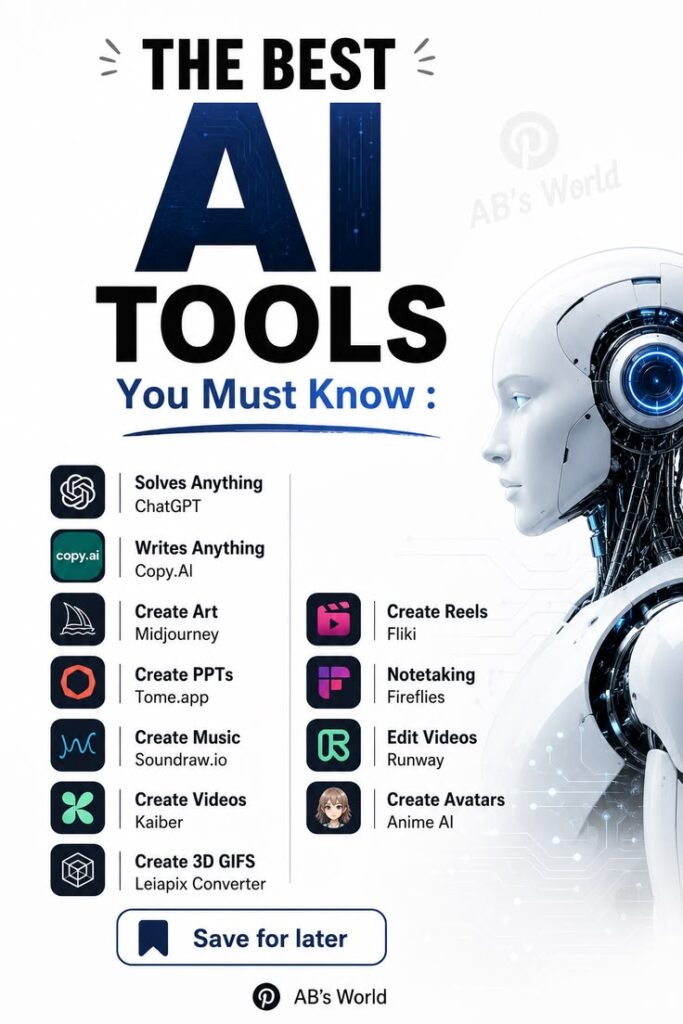
The educational landscape is shifting faster than ever before. If you are trying to keep up with demanding assignments, endless lectures, and complex projects, you probably already know that traditional study methods are no longer enough. Finding the best AI tools for student use can completely transform how you approach your coursework. Instead of pulling all-nighters or struggling with confusing concepts alone, you can leverage smart technology to study more efficiently. These applications do not just provide quick answers; they genuinely help you grasp difficult materials and organize your academic life.
Embracing these modern applications requires a shift in mindset. You should not view them as shortcuts for cheating, but rather as personalized digital tutors available around the clock. Whether you need help drafting a thesis, debugging computer code, or summarizing a fifty-page textbook chapter, there is a specialized application ready to assist. As we move deeper into 2026, the software market has exploded with specialized options tailored for different academic majors. Choosing the right software can reduce your stress levels, improve your grades, and leave you with more free time.
Many undergraduates ask exactly where to start learning artificial intelligence basics before diving into these advanced study aids. You do not need to be a computer science major to understand how machine learning works. Numerous online platforms offer introductory courses designed specifically for complete beginners. Websites like Coursera, edX, and Khan Academy provide free modules covering neural networks, natural language processing, and deep learning fundamentals. Gaining a basic understanding of these underlying technologies helps you use educational software much more effectively and ethically during your academic career.
If you want to know where to start learning artificial intelligence practically, the easiest way is simply by using generative models daily. Interacting with chatbots teaches you how to craft effective prompts and understand machine logic. You quickly learn that the quality of the output depends entirely on the clarity of your instructions. By experimenting with different prompts, you are essentially learning the basics of prompt engineering. This hands-on experience is incredibly valuable, giving you a competitive edge in both your current studies and your future professional career.
Let us dive into the top 10 AI tools currently dominating the educational space. These applications have been rigorously tested and proven to boost productivity across various subjects. First on our list is ChatGPT, which remains the undisputed king of versatile assistance [1.1.2, 1.1.4]. It excels at explaining confusing theories, generating essay outlines, and acting as a conversational study buddy [1.1.2]. Next is Perplexity AI, a massive upgrade for anyone tired of standard search engines. It acts as a citable research assistant, pulling information from credible web sources and providing exact links to its references [1.1.2, 1.1.3].
Continuing with our top 10 AI tools, we have Claude. This platform shines when it comes to analyzing massive documents. You can upload a lengthy research paper, and Claude will break down the core arguments without losing the nuanced details [1.1.3, 1.2.5]. Grammarly takes the fourth spot, moving beyond basic spell-checking to offer deep stylistic suggestions that make your writing sound professional [1.1.2]. For visual learners, Gamma AI is a lifesaver. It automatically generates beautiful, professional-looking presentations and slide decks from a simple text prompt, saving you hours of tedious formatting work [1.1.4, 1.2.1].
Halfway through the list, we find Notion AI. This workspace powerhouse helps you manage your weekly class schedule, track assignment deadlines, and organize research notes in one clean dashboard [1.1.3]. Quizlet AI takes the seventh spot, using intelligent algorithms to generate interactive flashcards and practice quizzes directly from your uploaded materials [1.1.1, 1.1.2]. For students dealing with audio lectures, Otter.ai is phenomenal. It automatically transcribes spoken words into searchable text, ensuring you never miss a crucial detail your professor mentions during a fast-paced classroom discussion [1.1.1, 1.1.2].
Rounding out our list are two highly specialized platforms. Mendeley is an absolute necessity for anyone working on research-intensive projects, as it automatically formats citations and manages academic papers seamlessly [1.1.2]. Finally, we have NotebookLM, Google’s incredible offering that grounds its answers purely in the documents you upload [1.1.1]. This prevents the software from hallucinating fake facts, making it arguably the most reliable study partner available. By integrating these ten diverse applications into your daily routine, you can drastically cut down on wasted time and focus on actual learning and comprehension.
Quick Comparison of the Top Study Assistants
Here is a breakdown to help you choose the right application based on your specific needs:
| Software Name | Best Used For | Key Feature |
|---|---|---|
| ChatGPT | General study help | Conversational learning |
| Perplexity AI | Researching topics | Clickable web citations |
| Claude | Document analysis | Long-context understanding |
| Grammarly | Proofreading text | Stylistic writing improvements |
| Gamma AI | Making presentations | Auto-generated slide decks |
| Notion AI | Organizing schedules | All-in-one workspace |
| Quizlet AI | Memorizing terms | Smart interactive flashcards |
| Otter.ai | Recording lectures | Automatic audio transcription |
| Mendeley | Managing references | Automated academic citations |
| NotebookLM | Safe data review | Source-grounded answers |
Taking good notes is the foundation of academic success, which brings us to the best AI tools for students for notes. Capturing information effectively during a lecture is notoriously difficult. Thankfully, modern software can take a messy, unorganized brain dump and turn it into a structured, highly readable outline. NotebookLM is currently leading the pack in this category [1.1.1]. You can drop in PDFs, lecture slides, and personal jottings, and the system will create a cohesive study guide that links everything together seamlessly without inventing fake information [1.1.1, 1.2.1].
Another fantastic option among the best AI tools for students for notes is Storyflow [1.1.1]. This application is perfect for visual thinkers who prefer mind maps over linear text documents. It reads your entire study canvas and helps you structure your writing logically [1.1.1]. If you prefer a more traditional document setup, Notion AI remains an excellent choice for organizing text-heavy lecture notes [1.1.2]. You can ask it to instantly summarize lengthy paragraphs, generate action items for upcoming group projects, and build comprehensive tables directly within your customized digital workspace [1.1.2, 1.1.3].
There is also Mindgrasp, which has become incredibly popular for tackling dense reading assignments. You simply upload your course materials, and it generates short summaries, key takeaways, and flashcards [1.2.3, 1.2.5]. This allows you to review massive textbooks in a fraction of the time it would usually take [1.2.5]. Using these intelligent note-taking systems ensures that your study sessions are productive rather than passive. Instead of mindlessly highlighting textbook pages, you are interacting with the material, asking questions, and solidifying your understanding before midterms and final exams roll around.
STEM majors face entirely different challenges, meaning they require highly specific software. When discussing the best AI tools for engineering students, standard chatbots often fall short. Engineering coursework involves complex mathematics, coding architecture, and physics simulations that require specialized computational engines. Wolfram Alpha stands out as an absolute necessity for anyone dealing with advanced calculus or structural equations [1.1.1, 1.2.2]. It does not just spit out a final answer; it computes equations step-by-step, helping you understand the underlying symbolic math and verify your manual calculations effectively [1.1.2, 1.2.2, 1.2.5].
For programming assignments, the best AI tools for engineering students include dedicated coding assistants like GitHub Copilot and Cursor AI [1.2.1]. GitHub Copilot integrates directly into your coding environment, suggesting real-time code completions and reducing repetitive typing tasks [1.2.4, 1.2.5]. It is like having a senior developer looking over your shoulder [1.2.4]. Cursor AI takes things a step further by combining an integrated development environment with conversational assistance [1.2.1]. You can ask it to identify subtle bugs, explain complex logic, or suggest performance improvements directly within your project workspace [1.2.1].
Mechanical and electrical engineering majors frequently rely on MATLAB, which now incorporates powerful machine learning features [1.2.2]. It is the industry standard for numerical work, signal processing, and visual simulations [1.2.2]. Another brilliant platform is Logically, an intelligent workspace designed specifically for drafting technical lab reports and literature reviews [1.2.5]. It extracts key insights from dense scientific PDFs and helps you organize methodologies and findings clearly [1.2.5]. Leveraging these targeted applications ensures that engineering majors spend less time struggling with syntax errors and more time understanding core design principles.
Specialized Software for Technical Majors
Technical students should consider these focused applications for their specific coursework:
- Wolfram Alpha: Perfect for verifying complex mathematical equations and understanding step-by-step calculus derivations [1.1.2, 1.2.2].
- GitHub Copilot: Essential for computer science majors needing real-time syntax suggestions and boilerplate code generation [1.2.1, 1.2.2].
- Cursor AI: An incredible code editor that helps debug broken scripts and explain confusing programming logic instantly [1.2.1].
- MATLAB: The go-to environment for simulating physical systems, analyzing data arrays, and running numerical methods [1.2.2].
- Logically: A dedicated assistant for formatting technical lab reports and organizing dense scientific research papers [1.2.5].
Figuring out exactly how to integrate these applications into your daily life can feel overwhelming initially. The secret is to avoid downloading every single application at once. Instead, identify your biggest academic bottleneck. Are you struggling with writer’s block? Use a conversational assistant to brainstorm essay topics. Do you spend hours formatting citations? Let a reference manager handle that tedious task. By targeting specific pain points, you create a sustainable digital routine that actually saves time. Gradually layer new applications into your workflow only when you feel comfortable with the basics.
Consider the financial aspect when building your study toolkit. A majority of the best AI tools for student use offer generous free tiers that cover basic educational needs. Do not rush into expensive monthly subscriptions until you have thoroughly tested the free versions. Often, combining several free applications yields better results than relying on one premium service. For instance, using a free audio transcriber alongside a free summarizing tool gives you comprehensive lecture notes without spending a dime. Be resourceful and strategic about which platforms genuinely deserve your hard-earned money.
Collaboration is another area where these technologies shine brightly. Group projects are notoriously difficult to coordinate, but shared digital workspaces make delegating tasks significantly easier. You can use intelligent platforms to assign deadlines, track individual contributions, and merge research notes into a single cohesive document. This eliminates the usual chaotic email chains and last-minute panic. When your entire project group uses the same organizational software, communication becomes transparent, and everyone stays aligned on the final goal, leading to better team grades and much less interpersonal friction.
While these intelligent applications offer incredible benefits, you must remain mindful of academic integrity. Universities are cracking down on plagiarism and unauthorized automation. The goal is to enhance your learning process, not bypass it entirely. Use these platforms to generate ideas, clarify confusing topics, and check your grammar. Never copy and paste machine-generated text directly into your final submissions. Treating these applications as collaborative study partners rather than ghostwriters guarantees that you actually learn the material while keeping your academic record completely spotless and respectable.
You should also verify every piece of factual information these models provide. Even the most advanced systems occasionally hallucinate or misinterpret complex data. Cross-referencing answers with your official textbooks or peer-reviewed journals is a crucial habit to develop. This critical thinking step reinforces your own knowledge while protecting you from embarrassing mistakes. As you experiment with the best AI tools for student success, focus on building workflows that support your unique learning style. The right combination of software can make your academic journey significantly smoother and more enjoyable.
Mastering these digital skills now will give you a massive advantage when you eventually enter the job market. Employers are actively seeking graduates who know how to collaborate with intelligent software to solve real-world problems. By learning how to prompt effectively, organize digital workflows, and troubleshoot technical issues, you are building a highly marketable resume. Your college years are the perfect testing ground for discovering which applications maximize your personal productivity. Start small, integrate one or two new platforms into your routine, and watch your academic performance soar to new heights.